---
sidebar_position: 1
---
# Room
### Working with group layers
If you use group layers in your map, to reference a layer in a group you will need to use a `/` to join layer names
together.
Example :
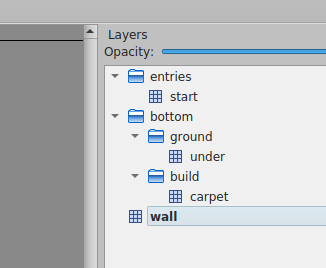
The name of the layers of this map are :
- `entries/start`
- `bottom/ground/under`
- `bottom/build/carpet`
- `wall`
### Detecting when the user enters/leaves a layer
```ts
WA.room.onEnterLayer(name: string): Subscription<{ reason: "initial" | "move" }>
WA.room.onLeaveLayer(name: string): Subscription<{ reason: "initial" | "move" }>
```
Listens to the position of the current user. The event is triggered when the user enters or leaves a given layer.
- **name**: the name of the layer who as defined in Tiled.
Example:
```ts
const myLayerSubscriber = WA.room.onEnterLayer("myLayer").subscribe(() => {
WA.chat.sendChatMessage("Hello!", "Mr Robot");
});
WA.room.onLeaveLayer("myLayer").subscribe(() => {
WA.chat.sendChatMessage("Goodbye!", "Mr Robot");
myLayerSubscriber.unsubscribe();
});
```
**Note:** If the user is already inside the layer when the `onEnterLayer` is subscribed to, the callback will fire immediately
upon subscription. Similarly, if the user is already outside the layer when an `onLeaveLayer` is subscribed to, that callback
will also fire immediately. If you want to avoid this behavior, you can check the "reason" parameter in the callback, which will
be "initial" in this case. If the user enters or leaves the layer after the subscription, the "reason" parameter will be "move".
```ts
WA.room.onEnterLayer("myLayer").subscribe(({ reason }) => {
if (reason === "initial") {
// The user was already on the layer when the subscription was made.
return;
}
// ...
});
```
### Show / Hide a layer
```ts
WA.room.showLayer(layerName : string): void
WA.room.hideLayer(layerName : string) : void
```
These 2 methods can be used to show and hide a layer. if `layerName` is the name of a group layer, show/hide all the
layer in that group layer.
Example :
```ts
WA.room.showLayer("bottom");
//...
WA.room.hideLayer("bottom");
```
### Set/Create properties in a layer
```ts
WA.room.setProperty(layerName : string, propertyName : string, propertyValue : string | number | boolean | undefined) : void;
```
Set the value of the `propertyName` property of the layer `layerName` at `propertyValue`. If the property doesn't exist,
create the property `propertyName` and set the value of the property at `propertyValue`.
Note :
To unset a property from a layer, use `setProperty` with `propertyValue` set to `undefined`.
Example :
```ts
WA.room.setProperty("wikiLayer", "openWebsite", "https://www.wikipedia.org/");
```
### Working with area objects
You can use Tiled objects of special class `area` to hold various properties, instead of layers. They, too, can be modified with scripting API.
### Create Area
```ts
WA.room.area.create(area: {
name: string, // Name of the area (must be unique)
x: number, // X position
y: number, // Y position
width: number, // Width size
height: number, // Height size
}): Area;
```
You can create new Area object (currently limited to rectangular shapes).
Example:
```ts
const area = WA.room.area.create({
name: 'MyNewArea',
x: 100,
y: 100,
width: 320,
height: 320,
});
```
### Get an Area
```ts
WA.room.area.get(name: string): Promise;
```
It is possible to get an existing Area object.
```ts
const area = await WA.room.area.get('MyNewArea');
```
### Modify Area
It is possible to modify already existing Area object (currently limited to x, y, width, height).
```ts
const area = await WA.room.area.get('MyNewArea');
if (area) {
area.x = 150;
area.y = 150;
}
```
### Delete Area
You can delete Area if it has a name.
```ts
WA.room.area.delete('MyNewArea');
```
### Detecting when the user enters/leaves an area
```ts
WA.room.area.onEnter(name: string): Subscription<{ reason: "initial" | "move" }>
WA.room.area.onLeave(name: string): Subscription<{ reason: "initial" | "move" }>
```
Listens to the position of the current user. The event is triggered when the user enters or leaves a given area.
- **name**: the name of the area as defined in Tiled.
Example:
```ts
const myAreaSubscriber = WA.room.area.onEnter("myArea").subscribe(() => {
WA.chat.sendChatMessage("Hello!", "Mr Robot");
});
WA.room.area.onLeave("myArea").subscribe(() => {
WA.chat.sendChatMessage("Goodbye!", "Mr Robot");
myAreaSubscriber.unsubscribe();
});
```
**Note:** If the user is already inside the area when the `onEnter` callback is registered, the callback will fire immediately
upon subscription. Similarly, if the user is already outside the area when an `onLeave` callback is registered, that
callback will also fire immediately. If you want to avoid this behavior, you can check the "reason" parameter in the
callback, which will be "initial" in this case. If the user enters or leaves the area after the subscription, the "reason"
parameter will be "move".
```ts
WA.room.area.onEnter("myArea").subscribe(({ reason }) => {
if (reason === "initial") {
// The user was already inside the area when the subscription was made.
return;
}
// ...
});
```
### Set/Create properties in an Area object
```ts
setProperty(propertyName : string, propertyValue : string | number | boolean | undefined) : void;
```
Set the value of the `propertyName` property of the area at `propertyValue`. If the property doesn't exist,
create the property `propertyName` and set the value of the property at `propertyValue`.
Note :
To unset a property from an area, use `setProperty` with `propertyValue` set to `undefined`.
Example :
```ts
const area = await WA.room.area.get('wikiArea');
area.setProperty("openWebsite", "https://www.wikipedia.org/");
```
### Get the room id
```ts
WA.room.id: string;
```
The ID of the current room is available from the `WA.room.id` property.
:::info
You need to wait for the end of the initialization before accessing `WA.room.id`
:::
```ts
WA.onInit().then(() => {
console.log("Room id: ", WA.room.id);
// Will output something like: 'https://play.workadventu.re/@/myorg/myworld/myroom', or 'https://play.workadventu.re/_/global/mymap.org/map.json"
});
```
### Get the map URL
```ts
WA.room.mapURL: string;
```
The URL of the map is available from the `WA.room.mapURL` property.
:::info
You need to wait for the end of the initialization before accessing `WA.room.mapURL`
:::
```ts
WA.onInit().then(() => {
console.log("Map URL: ", WA.room.mapURL);
// Will output something like: 'https://mymap.org/map.json"
});
```
### Getting map data
```ts
WA.room.getTiledMap(): Promise
```
Returns a promise that resolves to the JSON map file.
```ts
const map = await WA.room.getTiledMap();
console.log("Map generated with Tiled version ", map.tiledversion);
```
Check
the [Tiled documentation to learn more about the format of the JSON map](https://doc.mapeditor.org/en/stable/reference/json-map-format/)
.
### Get the URL hash parameters
```ts
WA.room.hashParameters: Record;
```
The parameters passed in the hash (#) are available in `WA.room.hashParameters` property.
Use this to pass parameters from the URL to your script.
:::info
You need to wait for the end of the initialization before accessing `WA.room.hashParameters`
:::
```ts
// If the URL is https://play.workadventu.re/_/global/mymap.org/map.json#myparam=hello
WA.onInit().then(() => {
console.log("Map URL: ", WA.room.hashParameters.myparam);
// Will output something like: 'hello"
});
```
### Changing tiles
```ts
WA.room.setTiles(tiles: TileDescriptor[]): void
```
Replace the tile at the `x` and `y` coordinates in the layer named `layer` by the tile with the id `tile`.
If `tile` is a string, it's not the id of the tile but the value of the property `name`.
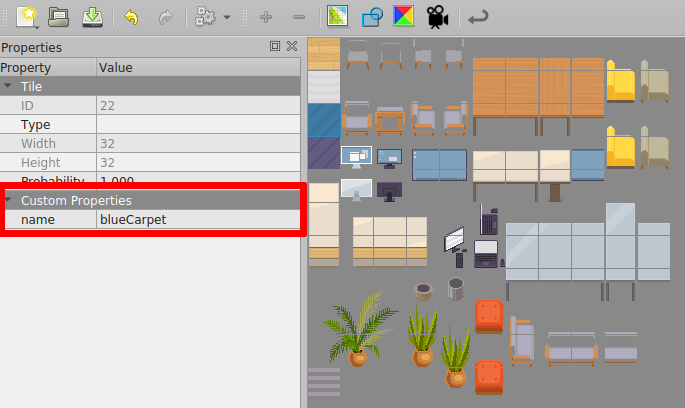
`TileDescriptor` has the following attributes :
- **x (number) :** The coordinate x of the tile that you want to replace.
- **y (number) :** The coordinate y of the tile that you want to replace.
- **tile (number | string) :** The id of the tile that will be placed in the map.
- **layer (string) :** The name of the layer where the tile will be placed.
**Important !** : If you use `tile` as a number, be sure to add the `firstgid` of the tileset of the tile that you want
to the id of the tile in Tiled Editor.
Note: If you want to unset a tile, use `setTiles` with `tile` set to `null`.
Example :
```ts
WA.room.setTiles([
{ x: 6, y: 4, tile: "blue", layer: "setTiles" },
{ x: 7, y: 4, tile: 109, layer: "setTiles" },
{ x: 8, y: 4, tile: 109, layer: "setTiles" },
{ x: 9, y: 4, tile: "blue", layer: "setTiles" },
]);
```
### Loading a tileset
```ts
WA.room.loadTileset(url: string): Promise
```
Load a tileset in JSON format from an url and return the id of the first tile of the loaded tileset.
You can create a tileset file in Tile Editor.
```ts
WA.room.loadTileset("Assets/Tileset.json").then((firstId) => {
WA.room.setTiles([{ x: 4, y: 4, tile: firstId, layer: "bottom" }]);
});
```
## Embedding websites in a map
You can use the scripting API to embed websites in a map, or to edit websites that are already embedded (using
the ["website" objects](/map-building/tiled-editor/website-in-map)).
### Getting an instance of a website already embedded in the map
```ts
WA.room.website.get(objectName: string): Promise
```
You can get an instance of an embedded website by using the `WA.room.website.get()` method. It returns a promise of
an `EmbeddedWebsite` instance.
```ts
// Get an existing website object where 'my_website' is the name of the object (on any layer object of the map)
const website = await WA.room.website.get("my_website");
website.url = "https://example.com";
website.visible = true;
```
### Adding a new website in a map
```ts
WA.room.website.create(website: CreateEmbeddedWebsiteEvent): EmbeddedWebsite
interface CreateEmbeddedWebsiteEvent {
name: string; // A unique name for this iframe
url: string; // The URL the iframe points to.
position: {
x: number, // In "game" pixels, relative to the map or player coordinates, depending on origin
y: number, // In "game" pixels, relative to the map or player coordinates, depending on origin
width: number, // In "game" pixels
height: number, // In "game" pixels
},
visible?: boolean, // Whether to display the iframe or not
allowApi?: boolean, // Whether the scripting API should be available to the iframe
allow?: string, // The list of feature policies allowed
origin: "player" | "map" // The origin used to place the x and y coordinates of the iframe's top-left corner, defaults to "map"
scale: number, // A ratio used to resize the iframe
}
```
You can create an instance of an embedded website by using the `WA.room.website.create()` method. It returns
an `EmbeddedWebsite` instance.
```ts
// Create a new website object
const website = WA.room.website.create({
name: "my_website",
url: "https://example.com",
position: {
x: 64,
y: 128,
width: 320,
height: 240,
},
visible: true,
allowApi: true,
allow: "fullscreen",
origin: "map",
scale: 1,
});
```
### Deleting a website from a map
```ts
WA.room.website.delete(name: string): Promise
```
Use `WA.room.website.delete` to completely remove an embedded website from your map.
### The EmbeddedWebsite class
Instances of the `EmbeddedWebsite` class represent the website displayed on the map.
```ts
class EmbeddedWebsite {
readonly name: string;
url: string;
visible: boolean;
allow: string;
allowApi: boolean;
x: number; // In "game" pixels, relative to the map or player coordinates, depending on origin
y: number; // In "game" pixels, relative to the map or player coordinates, depending on origin
width: number; // In "game" pixels
height: number; // In "game" pixels
origin: "player" | "map";
scale: number;
}
```
When you modify a property of an `EmbeddedWebsite` instance, the iframe is automatically modified in the map.
:::caution
The websites you add/edit/delete via the scripting API are only shown locally. If you want them
to be displayed for every player, you can use [variables](api-start.md) to share a common state between all users.
:::